
Most RTI scheduler advice never gets past the fundamentals: build your groups, run flex time, log attendance. That covers the standard best practices every guide repeats, but it doesn’t explain why one school’s RTI process runs like clockwork by year two while another is still fighting the exact same battles it had on day one.
The difference rarely comes down to the software. It comes down to a handful of less obvious habits that experienced schools pick up once they’ve moved past the setup phase.
Why Basic RTI Scheduler Setup Isn’t Enough
Building a schedule and slotting students into groups is table stakes. It answers “where does everyone go today,” but it says nothing about the harder question: is any of this actually working?
Schools that treat their RTI scheduler as a one-time setup project, rather than a living tool, tend to plateau fast. The schedule keeps running, attendance keeps getting logged, and nothing improves, because nobody’s actually using the data to make different decisions.
Getting past that plateau isn’t about buying a new tool. It’s about using the one you already have with more intention.
Tip 1: Treat Attendance Data as Decision Data, Not Paperwork
Most schools log attendance because it’s required. Far fewer act on it. That gap, between collecting data and actually using it, is what separates an average RTI process from a genuinely strong one.
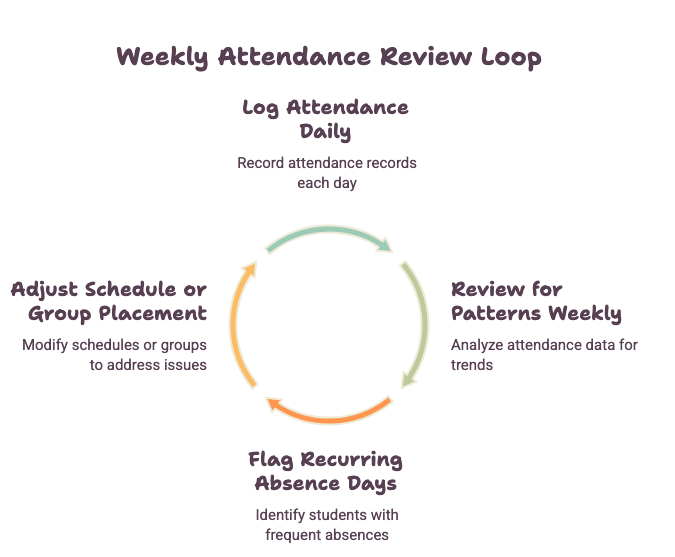
Look for patterns, not just totals. A student sitting at 80 percent attendance in flex time looks fine on paper. But if those absences cluster on the same day every week, that’s a scheduling conflict, not a motivation problem, and no percentage will ever surface it. Reviewing attendance by pattern instead of by total catches issues a standard report buries.
Illustrative example: picture a middle school where a group of Tier 2 math students keeps missing their Thursday flex block. The group’s overall attendance rate looks acceptable, so nothing gets flagged, until someone cross-checks absences by day of week and notices the block overlaps with a popular elective’s only meeting time. Moving the block by one period resolves most of the absences. That’s the kind of problem a pattern-level review catches and a monthly summary report doesn’t. (This is a composite scenario used to illustrate the point, not a documented case study. If you have a real example from your own school, it will carry far more weight than this one.)
Build a habit around reviewing, not just collecting. Attendance tracking only earns its keep if someone actually looks at it. A ten-minute weekly check catches problems that a monthly report will quietly bury in noise.
This lines up with what researchers behind the data-based individualization (DBI) framework have found in practice. In an interview with the National Center on Intensive Intervention, Dr. Sarah Powell, describing a DBI implementation project in middle school math, noted that getting assessments and progress-monitoring tools in place early in the year matters specifically so teachers can identify students needing intervention without delay. The value of the data depends on someone acting on it promptly, not just recording it. (NCII interview)
Tip 2: Build Flex Time Around Real-Time Data, Not Static Rosters
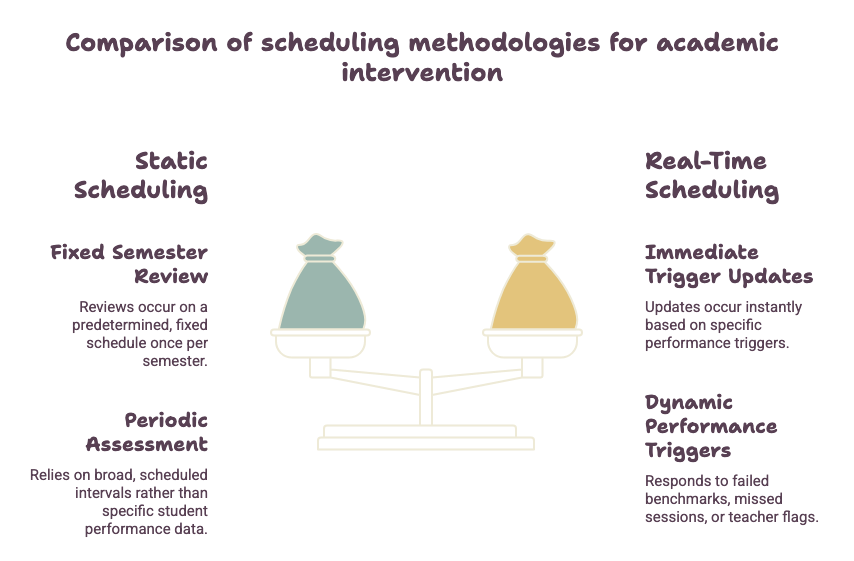
Plenty of schools build their RTI schedule once at the start of the semester and barely touch it again. That approach was fine when everything ran on paper rosters. It wastes the biggest advantage a modern scheduling tool offers: the ability to update as new data comes in.
Grades shift, behavior incidents happen, new assessment data arrives, all semester long. A schedule that only updates once a quarter is already stale by week three.
Set a trigger, not just a calendar reminder. Instead of reviewing placements only on a fixed date, build in triggers: a failed benchmark, three missed sessions, a teacher flag. Any one of those should prompt an immediate look at a student’s placement rather than waiting for the next scheduled review.
| Approach | How Groups Get Updated | Risk If Left Unchecked |
| Static (set once per semester) | Fixed review dates only | Students outgrow or fall behind their group without anyone noticing |
| Real-time (data triggers updates) | Immediate response to new data | Requires more staff attention, but catches problems early |
Tip 3: Use Service Learning as a Legitimate Support Tier
Community service and service learning rarely get taken seriously as academic support, yet the schools that use them well solve a real problem: keeping students engaged during extra help sessions.
Match the project to the skill gap. A service learning project built around budgeting, drafting a proposal, or measuring materials reinforces math and literacy skills without feeling like remedial work. In middle schools especially, this format tends to reach students who’ve already checked out of traditional extra help.
Schedule it with the same rigor as any other block. Community service that only shows up when there’s spare time won’t survive the semester. Give it the same structure as any other flex time rotation: defined sessions, attendance tracking, and a clear link to actual student needs.
This isn’t just intuition. A systematic review of K–12 service learning found it tends to increase engagement and motivation, and is particularly effective for students who don’t respond as well to traditional instruction. (PubMed) Research summarized by the Association for Middle Level Education has similarly connected middle school service learning participation to gains in social responsibility and academic outcomes. (AMLE)
Tip 4: Rotate Groups on a Predictable Cadence, Not an As-Needed Basis
Ad hoc regrouping feels responsive, but it makes the RTI process harder to run in practice. Staff lose track of who’s in which group, and students lose the consistency that makes intervention work in the first place.
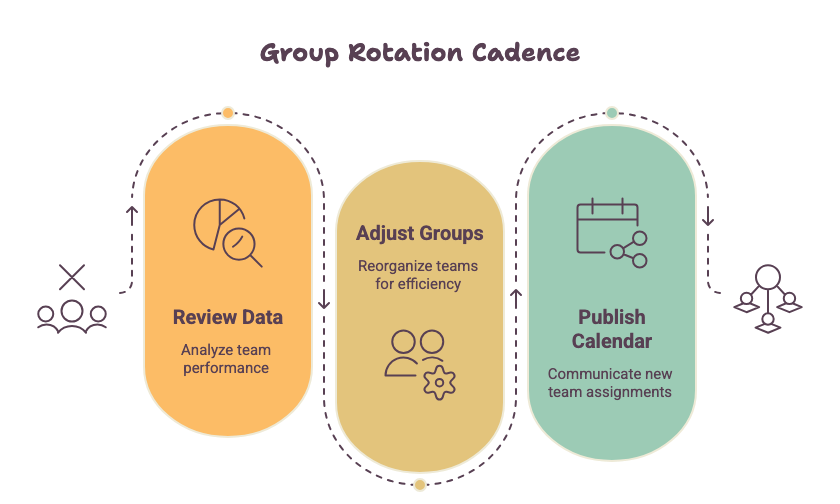
Publish a rotation calendar. Pick a fixed cadence, commonly every two to four weeks, and publish it ahead of time. A consistent, scheduled cycle for reviewing data and deciding whether an intervention needs adjusting tends to produce more reliable decisions than reviews that only happen once something’s already gone wrong.
Reserve exceptions for real emergencies. A predictable cadence doesn’t mean a rigid one. Urgent tier changes, like a student moving into Tier 3 support, should still happen immediately. The cadence governs routine adjustments, not crisis response.
Tip 5: Involve Teachers in RTI Scheduler Design, Not Just Execution
Teachers usually get handed a finished schedule and told to run it. Schools that get better long-term results build the schedule with teacher input from the start, not as an afterthought.
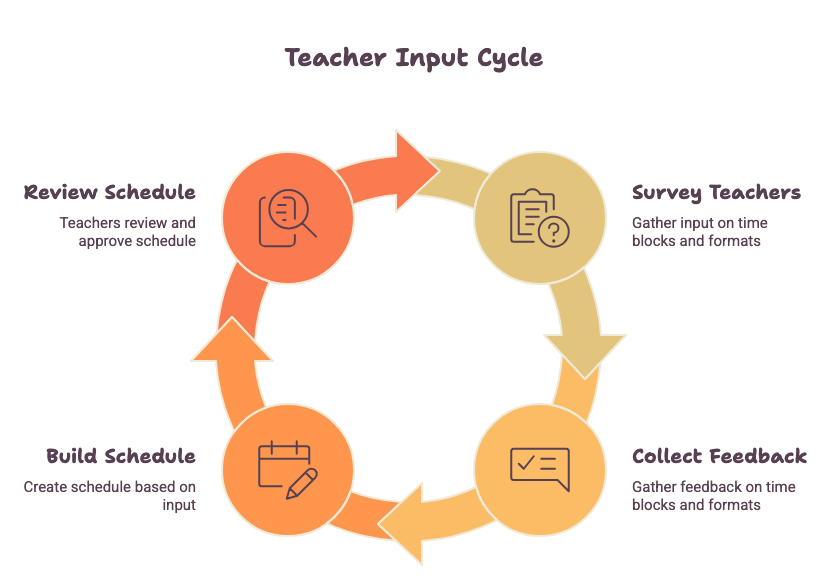
Ask before you build, not after. A simple survey, twice a year, on which time blocks work and which intervention formats actually land with students gives schedulers real information instead of guesswork.
This is worth taking seriously: one national survey found that only about half of teachers feel their opinions are factored into decisions at their own school, and teachers who do feel heard are far more likely to stay engaged in their work. (Edutopia) Edutopia has also documented that when teachers are brought into a decision early, rather than handed a finished policy, they tend to be genuinely invested in making the change work, instead of quietly working around it. (Edutopia)
Smaller Habits Worth Building In
A few smaller adjustments make the tips above easier to sustain, even if they don’t sound like breakthroughs on their own.
- Keep the RTI scheduler login simple. If staff dread logging in, they won’t check the tool often enough to catch the patterns above. Clear role-based views keep people in the habit of checking real data instead of relying on memory or a printed roster from three weeks ago. New to the tool? This guide on getting started quickly is worth a look.
- Use the RTI scheduler app for mobile access. Most staff only have a few spare minutes between classes. Being able to mark attendance or check a student’s group from a phone, rather than waiting until they’re back at a desk, is often the difference between current data and data that’s a week stale. See the full feature set for what’s available on mobile.
- Don’t forget enrichment while chasing intervention data. It’s easy for data-driven attention to land entirely on students who are behind. Students who’ve already mastered the material deserve the same rigor: real evidence they’re being challenged, not just an assumption that they’re fine because they’re not falling behind.
Common Roadblocks and How to Fix Them
| Roadblock | Better Approach |
| Teachers feel scheduling happens “to” them, leading to quiet workarounds | Survey staff before building the next rotation |
| Attendance data gets collected but never reviewed, so the same problems repeat | Set a recurring 10-minute weekly review |
| Groups only change when someone complains, causing inconsistent adjustments | Publish a fixed rotation cadence |
| Community service treated as filler time, leading to low engagement | Schedule it with defined sessions and clear goals |
Frequently Asked Questions
Does the RTI scheduler app work on mobile for hallway attendance checks? Where mobile access is available, yes, that’s specifically its value. A teacher can mark attendance or check a student’s current group between class periods rather than waiting to get back to a desk, which keeps the data current instead of a week stale.
How often should student groups be rotated? A predictable cadence of every two to four weeks works well for most schools, with exceptions carved out for urgent tier changes, like a student moving into Tier 3, that need an immediate response rather than waiting for the next scheduled rotation.
Can service learning really count as academic support? Research reviews suggest yes, provided it’s matched to a specific skill gap and scheduled with the same structure as other flex time blocks, rather than treated as filler for spare periods.
Final Thoughts
The schools getting the most out of their RTI scheduler aren’t running more advanced software. They’ve simply built better habits around the tool they already have: reviewing data instead of just collecting it, updating placements based on real triggers instead of a fixed calendar, treating service learning as genuine support instead of filler, and bringing teachers into the design process instead of handing them a finished product.
None of this requires new technology. It requires using what you have with a little more discipline.