
If you’ve ever tried to build an RTI schedule by hand, juggling spreadsheets, sticky notes, and a dozen teacher preferences, you already know why so many schools are switching to a dedicated RTI scheduler. Response to Intervention (RTI) only works when students actually get to the right room, at the right time, with the right support. When the schedule falls apart, so does everything else.

This guide walks through what actually makes an RTI scheduler effective, based on patterns that show up again and again in schools that get flex time right. Whether you’re setting up your first RTI process or trying to fix one that’s been limping along for years, you’ll find practical, usable tips here, not just theory.
By the end, you’ll know how to structure flex time blocks, track attendance without a headache, match students to the academic support they actually need, and avoid the mistakes that trip up most middle schools in their first year.
What Is an RTI Scheduler, and Why Does It Matter?
An RTI scheduler is a tool, often software-based, that helps schools organize intervention and enrichment blocks so every student ends up in the right group at the right time. Instead of a counselor manually re-sorting rosters every time a student’s needs change, a good scheduler automates the matching process based on data: assessment scores, teacher recommendations, attendance history, and behavior notes.
The reason this matters is simple. RTI only delivers results when it’s consistent. A student who’s supposed to get extra help in reading three times a week but only makes it twice, because of a scheduling conflict, isn’t getting the support the plan calls for. Multiply that by a few hundred students and you can see how quickly gaps form.
Schools that use platform features like these often find that flex time stops being a source of chaos and starts becoming one of the most productive parts of the school day. According to the RTI Action Network, RTI works best as a proactive, multi-tier framework rather than a reactive fix, which is exactly why consistent scheduling matters so much.
For example, a mid-sized middle school running WIN Time for roughly 600 students found that switching from spreadsheet-based scheduling to a dedicated RTI scheduler cut weekly rebuild time from several hours to under 30 minutes, while attendance tracking accuracy improved because sessions were logged digitally instead of on paper rosters that sometimes went missing between classrooms.
RTI Tiers at a Glance
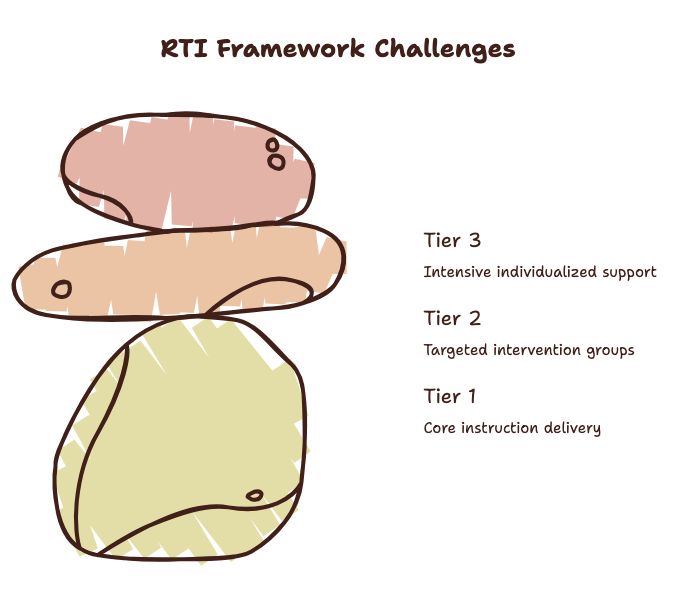
| Tier | Focus | Group Size | Typical Frequency |
|---|---|---|---|
| Tier 1 | Core instruction for all students | Whole class | Daily |
| Tier 2 | Targeted small-group intervention | 4 to 8 students | 3 to 5 times per week |
| Tier 3 | Intensive, individualized support | 1 to 3 students | Daily |
Building a Flex Time Schedule That Actually Works
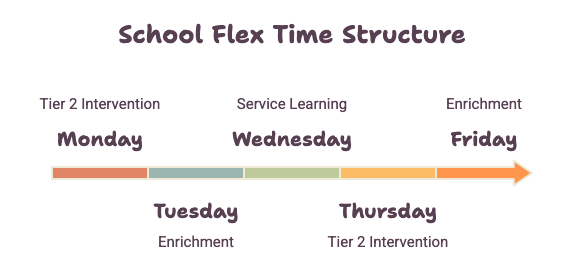
Flex time is the backbone of most RTI processes, a dedicated block where students rotate between intervention, enrichment, or extra help based on need. Getting it right takes more than blocking off 30 minutes on a master schedule.
Start With Real Student Needs, Not Guesswork
The most common mistake schools make is building the schedule first and fitting students into it afterward. Flip that. Pull your assessment data, teacher input, and attendance patterns before you touch the calendar. Group students by the specific skill gaps they have, not just by grade level or homeroom.
Keep Groups Small and Flexible
Large groups dilute the effectiveness of any intervention. Aim for small, focused groups that can shift as students progress. A student who moves from Tier 2 to Tier 1 support shouldn’t be stuck in the same group for the rest of the semester just because the schedule is hard to change.
Build in Buffer Time
Transitions eat up more time than most schedules account for, especially in middle schools where students are moving between classrooms. A few extra minutes built into each flex time block prevents the domino effect of late arrivals derailing the whole session.
Best Practices for Matching Students to Academic Support
Matching the right student to the right support is where most of the real value of an RTI scheduler shows up.
Use Multiple Data Points, Not Just One Test Score
Relying on a single benchmark score to place students is one of the fastest ways to misidentify need. Combine formative assessments, classroom performance, and teacher observations to get a fuller picture before assigning intervention groups. The Institute of Education Sciences has found that schools using multiple data points for RTI placement see more consistent outcomes than those relying on a single measure.
Re-Evaluate on a Regular Cadence
Student needs shift throughout the year. Set a recurring review, every four to six weeks works well for most schools, to check whether current placements still make sense. A scheduler that supports quick regrouping saves hours compared to manually rebuilding rosters each cycle.
Don’t Forget Enrichment
RTI isn’t only about catching students up. Enriching students who’ve already mastered a skill keeps them engaged instead of sitting through material they don’t need. A well-designed schedule treats enrichment groups with the same care as intervention groups, not as an afterthought. Middle schools that get this right often see fewer behavior issues during flex time, since bored, high-performing students are just as likely to disengage as struggling ones when there’s nothing challenging them.
Attendance Tracking: The Piece Schools Underestimate
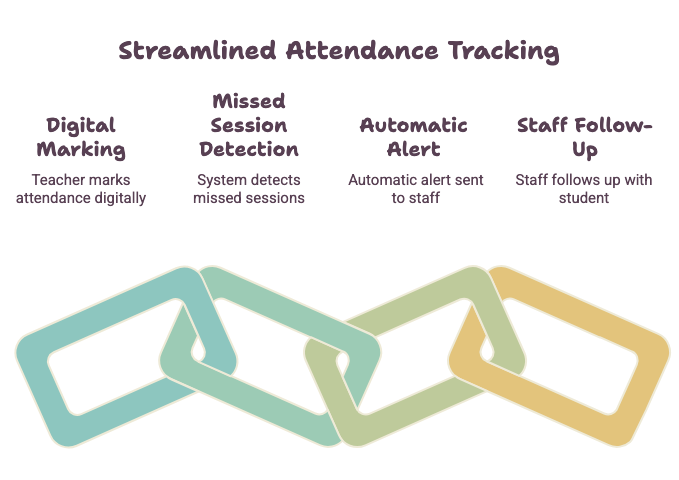
Attendance tracking inside an RTI process does more than mark who showed up. It tells you whether the intervention is actually reaching the students it’s meant for.
Set Alerts for Missed Sessions
If a student misses three flex time sessions in a row, someone should know before it becomes a pattern. Automated attendance tracking through your rti scheduler app can flag this instantly, instead of a staff member noticing it weeks later during a report review.
Connect Attendance to Progress Monitoring
Attendance data means little on its own. Pair it with progress monitoring so you can see whether inconsistent attendance is affecting outcomes. This connection often reveals logistical problems, like a scheduling conflict with another class, rather than a motivation issue.
Make Reporting Simple for Teachers
Teachers are far more likely to keep attendance current when the process takes seconds, not minutes. Look for a scheduler with a clean rti scheduler login and a simple interface, so daily tracking doesn’t become another item on an already long list.
Service Learning and Community Service: An Underused RTI Tool
Service learning and community service opportunities are often left out of RTI conversations entirely, but they can be a genuinely effective form of academic support, especially for middle schools looking to build engagement alongside skill development.
Tie Service Projects to Skill Goals
A community service project that involves writing, planning, or basic math naturally reinforces academic skills in a lower-pressure setting. Students who struggle with traditional classroom instruction sometimes respond better when the same skill shows up in a hands-on project.
Schedule Service Learning Like Any Other Intervention
Treat service learning blocks with the same scheduling discipline as core intervention time. If it’s optional or unstructured, it tends to disappear from the rotation. Building it into your master schedule signals that it’s a real part of the RTI process, not an extra.
Common Scheduling Mistakes That Undermine the RTI Process
Even schools with strong intentions run into the same handful of scheduling problems.
Overloading a Single Time Block
Cramming every intervention, enrichment group, and support service into one flex time slot creates staffing conflicts and long wait times for students who need multiple types of support. Spread services across two or more blocks where possible.
Ignoring Staff Availability Constraints
A schedule that looks perfect on paper but doesn’t account for staff planning periods, co-teaching arrangements, or specialist availability will fall apart within the first two weeks. Build staff constraints into the schedule from day one, not as a fix after complaints start coming in. The U.S. Department of Education also notes that early intervening services depend heavily on consistent staffing and scheduling to remain compliant and effective.
Skipping a Trial Run
Rolling out a new RTI schedule school-wide without testing it on a smaller scale first is risky. A one- or two-week trial with a single grade level surfaces problems, like transition timing or room conflicts, while they’re still easy to fix.
Quick Reference: Mistakes and Fixes
| Common Mistake | Why It Hurts the Process | Simple Fix |
|---|---|---|
| Overloading one time block | Staffing conflicts, long wait times | Spread services across two or more blocks |
| Ignoring staff availability | Schedule collapses within weeks | Build staff constraints in from day one |
| Skipping a trial run | Problems surface school-wide at once | Pilot with one grade level first |
| Placing students on one test score | Misidentifies real student need | Combine assessments, grades, and teacher input |
Choosing the Right RTI Scheduler App for Your School
Not every scheduler is built the same way, and the right choice depends on your school’s size, staffing structure, and how much manual adjustment you’re willing to do.
Look for Flexibility Over Rigid Templates
Every school’s RTI process looks a little different. A scheduler that forces you into a fixed template will eventually become a workaround-generating headache. Look for tools that let you customize group sizes, time blocks, and data sources.
Prioritize Ease of Use for Staff
If the platform is complicated, adoption suffers, and staff quietly revert to spreadsheets. A straightforward rti scheduler login, clear dashboards, and minimal training time go a long way toward getting buy-in from busy teachers.
Check for Reliable Support and Guides
Even well-designed tools raise questions during setup. Resources like these setup guides can shorten the learning curve significantly, especially for schools implementing RTI scheduling software for the first time. This in-depth guide is also worth reviewing when comparing options for your building.
Manual Scheduling vs. an RTI Scheduler App
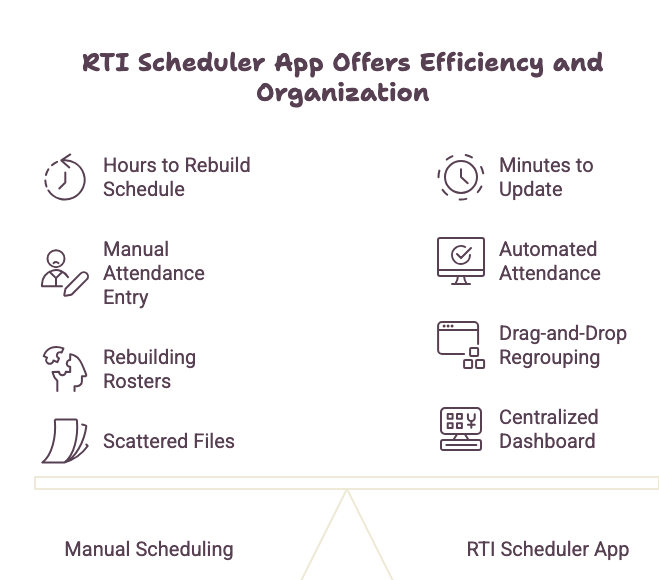
| Factor | Manual (Spreadsheets) | RTI Scheduler App |
|---|---|---|
| Time to rebuild a schedule | Hours, often redone weekly | Minutes, updates in real time |
| Attendance tracking | Manual entry, easy to miss | Automated, with alerts |
| Regrouping students | Requires rebuilding rosters | Drag-and-drop or auto-placement |
| Visibility for staff | Limited, scattered files | Centralized dashboards |
| Compliance reporting | Time-consuming to compile | Generated automatically |
Frequently Asked Questions
What is the main purpose of an RTI scheduler? An RTI scheduler organizes intervention and enrichment time so students are matched to the right academic support based on data, rather than manual guesswork. It streamlines flex time, tracks attendance, and helps staff regroup students as needs change.
How often should RTI groups be re-evaluated? Most schools find a four-to-six-week review cycle works well, though this can shift based on the intensity of intervention. Frequent, short check-ins usually catch problems faster than waiting for a full grading period.
Can RTI scheduling work for community service and service learning programs? Yes. Service learning and community service projects can reinforce academic skills in a practical setting. Scheduling them with the same structure as other intervention blocks helps ensure they remain a consistent part of the RTI process rather than an occasional extra.
What’s the biggest mistake schools make when setting up flex time? Building the schedule before reviewing student data. Starting with real needs, assessment results, teacher input, attendance patterns, leads to a far more effective flex time structure than starting with a blank calendar and fitting students in afterward.
Is RTI scheduling software necessary, or can schools manage with spreadsheets? Smaller schools sometimes manage short-term with spreadsheets, but as student numbers grow, manual tracking becomes error-prone and time-consuming. A dedicated rti scheduler app reduces staff workload and catches issues, like missed sessions, that spreadsheets often miss.
Final Thoughts
A strong RTI scheduler isn’t just a convenience, it’s what makes consistent, data-driven support possible at scale. The schools that get the most out of their RTI process treat scheduling as a core part of instruction, not an administrative afterthought. Start with real student needs, keep your flex time structure flexible, track attendance closely, and don’t overlook service learning as a legitimate form of academic support.
Ready to stop rebuilding your schedule from scratch every week? Take a closer look at how a purpose-built RTI scheduler handles flex time, attendance tracking, and student support, and see how much time your team gets back each week once the guesswork is gone.