
If you’ve ever spent your Sunday night buried in spreadsheets trying to figure out which students need extra help on Monday morning, you already know the problem. Response to Intervention (RTI) programs are one of the most effective tools schools have for catching struggling students early, but the scheduling behind them can eat up hours that teachers and interventionists simply don’t have.

That’s where an RTI scheduler comes in. Instead of juggling color-coded spreadsheets, sticky notes, and email chains, educators can use purpose-built software to organize intervention groups, track attendance, and match students with the right support at the right time.
In this guide, we’ll cover what an RTI scheduler actually does, why it matters especially in busy middle schools, and how to choose and use one effectively. For a deeper dive into setup, check out our RTI scheduler guide hub, which walks you through the process step by step.
What Is an RTI Scheduler, and Why Does It Matter?
An RTI scheduler is a tool, usually software-based, that automates the process of organizing intervention and enrichment blocks within a school day. Instead of manually assigning students to reading groups or support sessions, the scheduler handles the logistics: matching student needs to available staff, avoiding time conflicts, and keeping a clear record of who attended what.
At its core, an effective scheduler answers three questions:
- Which students need support right now, based on current data?
- Which staff members and time slots are available to provide that support?
- How do we track whether the intervention is actually happening?
Without a system built for this, schools rely on manual processes that break down as soon as a schedule changes, a student moves groups, or a teacher is absent. A dedicated RTI scheduler solves this by centralizing everything in one place, cutting down on double-booked rooms and missed sessions.
The Real Cost of Manual Scheduling
Ask any instructional coach how they built last year’s intervention schedule, and you’ll likely hear a story involving spreadsheets, a whiteboard, and more than a few headaches. Manual scheduling isn’t just tedious, it’s error-prone. A single typo can mean a missed session, or two interventions double-booked in the same room.
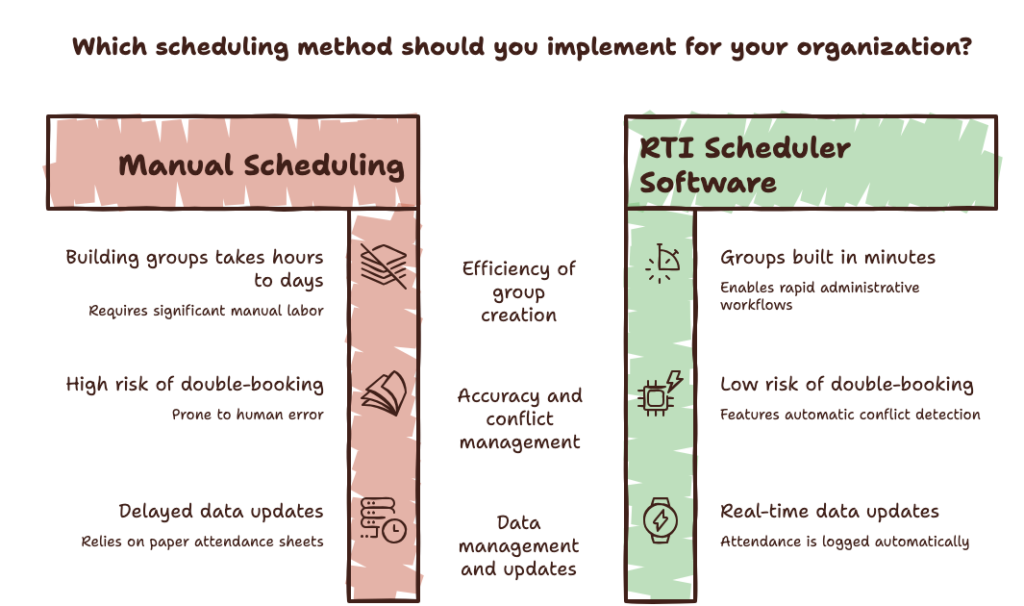
Time is the bigger issue, though. Administrative tasks are consistently one of the biggest drains on educator time. The table below compares the two approaches:
| Task | Manual Scheduling | RTI Scheduler Software |
| Building initial groups | Hours to days, cross-referencing spreadsheets | Minutes, based on set rules and current data |
| Adjusting for a schedule change | Manual rework across multiple documents | Automatic conflict detection and re-slotting |
| Tracking attendance | Paper sign-in sheets, prone to loss | Logged automatically in real time |
| Updating groups from new data | Often delayed until a data meeting | Updated as soon as new scores are entered |
| Risk of double-booking | High, especially with limited staff or rooms | Low, flagged automatically by the system |
Key Features to Look For in an RTI Scheduler
Not all scheduling tools are created equal. When evaluating options, keep an eye out for these core features.
Flexible, Rules-Based Scheduling
The best schedulers let you set rules for caseloads, staff availability, room capacity, and grouping by skill level, then generate a schedule automatically. This is especially valuable in middle schools, where finding a common intervention window can feel like solving a puzzle.
Built-In Attendance Tracking
Attendance tracking isn’t optional in an RTI framework. It’s often required for documentation and compliance. A good scheduler logs attendance automatically, rather than relying on paper sign-in sheets that get lost, so you have a reliable record ready for a data meeting.
Data Integration for Academic Support
The strongest tools connect directly to your student information system, so academic support groups form based on real, current performance data rather than last quarter’s guesswork. This mirrors guidance on progress monitoring best practices, which emphasizes revisiting intervention decisions regularly as new data comes in.
Support for Enrichment and Service Learning
RTI scheduling isn’t just about remediation. Many schools use the same infrastructure for enriching students who are ahead of grade level, offering extension activities, leadership opportunities, or community service and service learning projects during flexible blocks. A scheduler that handles both intervention and enrichment in one system saves you from running two separate processes. Our guide on how the RTI scheduler boosts student focus breaks down how well-structured scheduling improves engagement.
How to Choose the Right RTI Scheduler for Your School
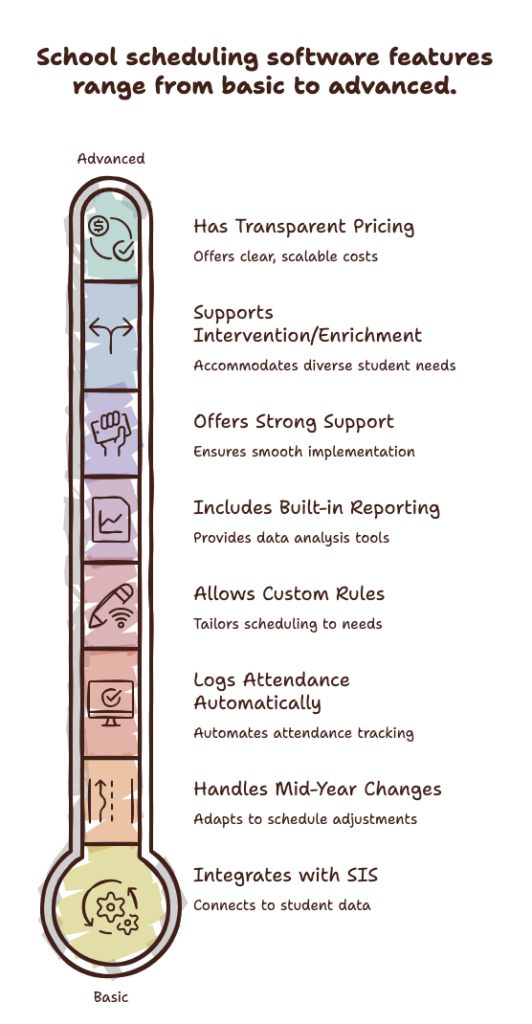
With so many options on the market, it helps to evaluate tools against a consistent checklist rather than picking based on a demo alone. Before committing, ask:
- Does it integrate with your student information system?
- Can it handle mid-year changes without a full rebuild?
- Does it log attendance automatically by default?
- Can staff set custom rules for caseloads, room capacity, and availability?
- Is reporting built in, without exporting to a separate spreadsheet?
- What does onboarding and support look like for staff?
- Does it support both intervention and enrichment scheduling?
- Is pricing transparent and scalable per building or student?
Walking through this list with your intervention team before you buy can save months of frustration down the line.
How an RTI Scheduler Supports Different Tiers of Intervention
RTI is built around a tiered model, and your scheduling tool should reflect that structure. According to the Colorado RTI practitioner’s guide, each tier requires distinct intensity, group size, and progress monitoring, all of which shape how schedules need to be built.
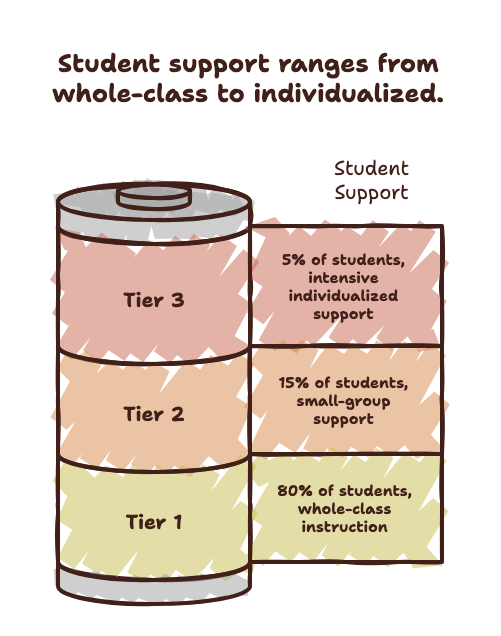
[Insert the RTI tier pyramid graphic here, showing Tier 1 at 80% of students, Tier 2 at 15%, and Tier 3 at 5%.]
| Tier | Group Size | Typical Frequency | Session Length | Progress Monitoring |
| Tier 1 | Whole class | Daily, built into core instruction | Ongoing | Universal screening, 2 to 3 times per year |
| Tier 2 | Small groups (4 to 6 students) | 3 to 4 times per week | 20 to 30 minutes | Every 1 to 2 weeks |
| Tier 3 | Individual or very small groups | Daily | 30 to 45 minutes | Weekly |
Tier 1: Whole-Class Strategies
Tier 1 support happens within the regular classroom, so scheduling needs are lighter, mostly about ensuring teachers have access to shared resources and data dashboards.
Tier 2: Targeted Small-Group Support
This is where scheduling complexity kicks in. Tier 2 typically involves small groups meeting several times a week for extra help in specific skills, like fluency or fraction operations. An RTI scheduler makes it possible to build these groups quickly, adjust them as data comes in, and avoid conflicts with a student’s core classes.
Tier 3: Intensive, Individualized Support
Tier 3 students often need daily, one-on-one or very small-group sessions. Because the stakes are higher and the margin for error is smaller, automated tools are especially valuable here. A missed session can set a student back further than at other tiers.
RTI by the Numbers
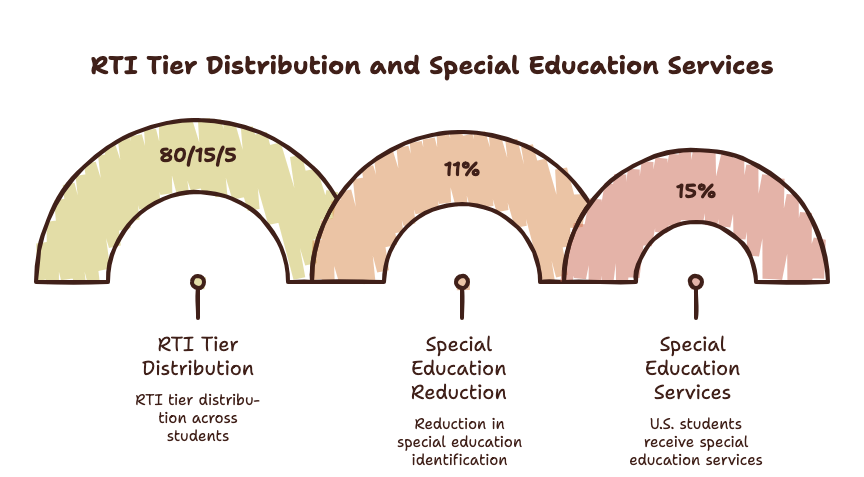
A few data points put the scale of RTI scheduling into perspective. In a typical RTI pyramid, roughly 80% of students fall within Tier 1, 15% need Tier 2 support, and about 5% require intensive Tier 3 intervention, so even a mid-sized school will have dozens of students needing tracked support at any given time. A 2024 study from the Annenberg Institute at Brown University found that state-level RTI adoption reduced special education identification by roughly 11%, showing that well-run intervention systems can meaningfully change outcomes.
Best Practices for Implementing an RTI Scheduler
Rolling out a new scheduling system works best when approached deliberately. Here are some best practices worth following.
1. Start With Clean Data
Before scheduling a single session, make sure student data, including benchmark scores, IEP or 504 flags, and current groupings, is accurate. A scheduler is only as good as the information feeding it.
2. Involve Staff Early
Teachers and interventionists know the day-to-day realities of the schedule best. Get their input on constraints like lunch duty and room availability before finalizing the master schedule.
3. Build in Flexibility for Mid-Year Changes
Student needs change throughout the year. Choose a system that makes it easy to move a student between groups without a full rebuild.
4. Train Staff on the Tool
A scheduler only saves time if people use it correctly. Budget time for a short training session and a simple reference sheet.
5. Review Data Regularly
Set a recurring weekly or biweekly time to review attendance and progress data. This keeps intervention groups responsive rather than static. Our RTI scheduler guides cover common scheduling conflicts and fixes in more detail.
Why Middle Schools Face Unique Scheduling Challenges
Elementary schools have more flexibility since students stay with one teacher most of the day, and high schools have flexibility through elective periods. Middle schools sit in an awkward middle ground: students rotate through five to seven classes a day with different teachers, making a common intervention block genuinely difficult to find.
This is one reason middle schools benefit most from dedicated scheduling software. A research brief on RTI middle school scheduling found that scheduling was one of the most commonly cited implementation challenges, largely due to rotating class periods. Cross-referencing seven class schedules for every student who needs support is nearly impossible by hand in a school with several hundred students. An automated scheduler processes these constraints in seconds, freeing up staff time for instruction.
Beyond Academics: Using RTI Scheduling for Enrichment and Community Service
RTI infrastructure doesn’t have to be limited to remediation. Many schools use their scheduling blocks, often called WIN (What I Need) time or flex blocks, to offer enrichment alongside support services.
This might include community service projects, leadership clubs, peer tutoring, or service learning initiatives that connect classroom learning to real-world experience. Using the same scheduler for both intervention and enrichment means every student gets a purposeful block of time each day, and staff planning stays simple with one master schedule.
Frequently Asked Questions
What does an RTI scheduler do? It automates the process of organizing intervention and enrichment groups. It matches students to support sessions, avoids time and room conflicts, and tracks attendance automatically, replacing manual spreadsheet scheduling.
How is an RTI scheduler different from a regular class scheduler? A standard master scheduler organizes core classes for the full year. An RTI scheduler is more dynamic, built to handle frequent changes as data updates and groups shift.
Can an RTI scheduler help with attendance tracking? Yes. Most tools include built-in attendance tracking, logging participation automatically so schools have accurate records for compliance and progress monitoring.
Is an RTI scheduler only useful for struggling students? No. Many schools use the same system to organize enrichment activities, community service opportunities, and service learning projects for all students.
Do middle schools benefit more from RTI scheduling software? Yes, generally. Students rotate through multiple classes and teachers each day, making manual scheduling especially difficult. An automated scheduler simplifies finding common intervention windows across complex rotations.
Final Thoughts: Give Your Team Back Their Time
Running an effective RTI program shouldn’t require sacrificing your evenings and weekends to spreadsheet gymnastics. A well-chosen RTI scheduler takes the guesswork out of grouping students, tracking attendance, and coordinating staff, leaving educators more time for what matters: supporting students.
Whether you’re setting up intervention blocks for the first time or replacing a system that isn’t working, it’s worth getting your scheduling process right. Explore our RTI scheduler resource hub for tools, guides, and best practices to help your team build a program that runs smoothly all year.
If you’ve ever spent your Sunday night buried in spreadsheets trying to figure out which students need extra help on Monday morning, you already know the problem. Response to Intervention (RTI) programs are one of the most effective tools schools have for catching struggling students early, but the scheduling behind them can eat up hours that teachers and interventionists simply don’t have.
That’s where an RTI scheduler comes in. Instead of juggling color-coded spreadsheets, sticky notes, and email chains, educators can use purpose-built software to organize intervention groups, track attendance, and match students with the right support at the right time.
In this guide, we’ll cover what an RTI scheduler actually does, why it matters especially in busy middle schools, and how to choose and use one effectively. For a deeper dive into setup, check out our RTI scheduler guide hub, which walks you through the process step by step.
What Is an RTI Scheduler, and Why Does It Matter?
An RTI scheduler is a tool, usually software-based, that automates the process of organizing intervention and enrichment blocks within a school day. Instead of manually assigning students to reading groups or support sessions, the scheduler handles the logistics: matching student needs to available staff, avoiding time conflicts, and keeping a clear record of who attended what.
At its core, an effective scheduler answers three questions:
- Which students need support right now, based on current data?
- Which staff members and time slots are available to provide that support?
- How do we track whether the intervention is actually happening?
Without a system built for this, schools rely on manual processes that break down as soon as a schedule changes, a student moves groups, or a teacher is absent. A dedicated RTI scheduler solves this by centralizing everything in one place, cutting down on double-booked rooms and missed sessions.
The Real Cost of Manual Scheduling
Ask any instructional coach how they built last year’s intervention schedule, and you’ll likely hear a story involving spreadsheets, a whiteboard, and more than a few headaches. Manual scheduling isn’t just tedious, it’s error-prone. A single typo can mean a missed session, or two interventions double-booked in the same room.
Time is the bigger issue, though. Administrative tasks are consistently one of the biggest drains on educator time. The table below compares the two approaches:
| Task | Manual Scheduling | RTI Scheduler Software |
| Building initial groups | Hours to days, cross-referencing spreadsheets | Minutes, based on set rules and current data |
| Adjusting for a schedule change | Manual rework across multiple documents | Automatic conflict detection and re-slotting |
| Tracking attendance | Paper sign-in sheets, prone to loss | Logged automatically in real time |
| Updating groups from new data | Often delayed until a data meeting | Updated as soon as new scores are entered |
| Risk of double-booking | High, especially with limited staff or rooms | Low, flagged automatically by the system |
Key Features to Look For in an RTI Scheduler
Not all scheduling tools are created equal. When evaluating options, keep an eye out for these core features.
Flexible, Rules-Based Scheduling
The best schedulers let you set rules for caseloads, staff availability, room capacity, and grouping by skill level, then generate a schedule automatically. This is especially valuable in middle schools, where finding a common intervention window can feel like solving a puzzle.
Built-In Attendance Tracking
Attendance tracking isn’t optional in an RTI framework. It’s often required for documentation and compliance. A good scheduler logs attendance automatically, rather than relying on paper sign-in sheets that get lost, so you have a reliable record ready for a data meeting.
Data Integration for Academic Support
The strongest tools connect directly to your student information system, so academic support groups form based on real, current performance data rather than last quarter’s guesswork. This mirrors guidance on progress monitoring best practices, which emphasizes revisiting intervention decisions regularly as new data comes in.
Support for Enrichment and Service Learning
RTI scheduling isn’t just about remediation. Many schools use the same infrastructure for enriching students who are ahead of grade level, offering extension activities, leadership opportunities, or community service and service learning projects during flexible blocks. A scheduler that handles both intervention and enrichment in one system saves you from running two separate processes. Our guide on how the RTI scheduler boosts student focus breaks down how well-structured scheduling improves engagement.
How to Choose the Right RTI Scheduler for Your School
With so many options on the market, it helps to evaluate tools against a consistent checklist rather than picking based on a demo alone. Before committing, ask:
Walking through this list with your intervention team before you buy can save months of frustration down the line.
How an RTI Scheduler Supports Different Tiers of Intervention
RTI is built around a tiered model, and your scheduling tool should reflect that structure. According to the Colorado RTI practitioner’s guide, each tier requires distinct intensity, group size, and progress monitoring, all of which shape how schedules need to be built.
| Tier | Group Size | Typical Frequency | Session Length | Progress Monitoring |
| Tier 1 | Whole class | Daily, built into core instruction | Ongoing | Universal screening, 2 to 3 times per year |
| Tier 2 | Small groups (4 to 6 students) | 3 to 4 times per week | 20 to 30 minutes | Every 1 to 2 weeks |
| Tier 3 | Individual or very small groups | Daily | 30 to 45 minutes | Weekly |
Tier 1: Whole-Class Strategies
Tier 1 support happens within the regular classroom, so scheduling needs are lighter, mostly about ensuring teachers have access to shared resources and data dashboards.
Tier 2: Targeted Small-Group Support
This is where scheduling complexity kicks in. Tier 2 typically involves small groups meeting several times a week for extra help in specific skills, like fluency or fraction operations. An RTI scheduler makes it possible to build these groups quickly, adjust them as data comes in, and avoid conflicts with a student’s core classes.
Tier 3: Intensive, Individualized Support
Tier 3 students often need daily, one-on-one or very small-group sessions. Because the stakes are higher and the margin for error is smaller, automated tools are especially valuable here. A missed session can set a student back further than at other tiers.
RTI by the Numbers
A few data points put the scale of RTI scheduling into perspective. In a typical RTI pyramid, roughly 80% of students fall within Tier 1, 15% need Tier 2 support, and about 5% require intensive Tier 3 intervention, so even a mid-sized school will have dozens of students needing tracked support at any given time. A 2024 study from the Annenberg Institute at Brown University found that state-level RTI adoption reduced special education identification by roughly 11%, showing that well-run intervention systems can meaningfully change outcomes.
Best Practices for Implementing an RTI Scheduler
Rolling out a new scheduling system works best when approached deliberately. Here are some best practices worth following.
1. Start With Clean Data
Before scheduling a single session, make sure student data, including benchmark scores, IEP or 504 flags, and current groupings, is accurate. A scheduler is only as good as the information feeding it.
2. Involve Staff Early
Teachers and interventionists know the day-to-day realities of the schedule best. Get their input on constraints like lunch duty and room availability before finalizing the master schedule.
3. Build in Flexibility for Mid-Year Changes
Student needs change throughout the year. Choose a system that makes it easy to move a student between groups without a full rebuild.
4. Train Staff on the Tool
A scheduler only saves time if people use it correctly. Budget time for a short training session and a simple reference sheet.
5. Review Data Regularly
Set a recurring weekly or biweekly time to review attendance and progress data. This keeps intervention groups responsive rather than static. Our RTI scheduler guides cover common scheduling conflicts and fixes in more detail.
Why Middle Schools Face Unique Scheduling Challenges
Elementary schools have more flexibility since students stay with one teacher most of the day, and high schools have flexibility through elective periods. Middle schools sit in an awkward middle ground: students rotate through five to seven classes a day with different teachers, making a common intervention block genuinely difficult to find.
This is one reason middle schools benefit most from dedicated scheduling software. A research brief on RTI middle school scheduling found that scheduling was one of the most commonly cited implementation challenges, largely due to rotating class periods. Cross-referencing seven class schedules for every student who needs support is nearly impossible by hand in a school with several hundred students. An automated scheduler processes these constraints in seconds, freeing up staff time for instruction.
Beyond Academics: Using RTI Scheduling for Enrichment and Community Service
RTI infrastructure doesn’t have to be limited to remediation. Many schools use their scheduling blocks, often called WIN (What I Need) time or flex blocks, to offer enrichment alongside support services.
This might include community service projects, leadership clubs, peer tutoring, or service learning initiatives that connect classroom learning to real-world experience. Using the same scheduler for both intervention and enrichment means every student gets a purposeful block of time each day, and staff planning stays simple with one master schedule.
Frequently Asked Questions
What does an RTI scheduler do? It automates the process of organizing intervention and enrichment groups. It matches students to support sessions, avoids time and room conflicts, and tracks attendance automatically, replacing manual spreadsheet scheduling.
How is an RTI scheduler different from a regular class scheduler? A standard master scheduler organizes core classes for the full year. An RTI scheduler is more dynamic, built to handle frequent changes as data updates and groups shift.
Can an RTI scheduler help with attendance tracking? Yes. Most tools include built-in attendance tracking, logging participation automatically so schools have accurate records for compliance and progress monitoring.
Is an RTI scheduler only useful for struggling students? No. Many schools use the same system to organize enrichment activities, community service opportunities, and service learning projects for all students.
Do middle schools benefit more from RTI scheduling software? Yes, generally. Students rotate through multiple classes and teachers each day, making manual scheduling especially difficult. An automated scheduler simplifies finding common intervention windows across complex rotations.
Final Thoughts: Give Your Team Back Their Time
Running an effective RTI program shouldn’t require sacrificing your evenings and weekends to spreadsheet gymnastics. A well-chosen RTI scheduler takes the guesswork out of grouping students, tracking attendance, and coordinating staff, leaving educators more time for what matters: supporting students.
Whether you’re setting up intervention blocks for the first time or replacing a system that isn’t working, it’s worth getting your scheduling process right. Explore our RTI scheduler resource hub for tools, guides, and best practices to help your team build a program that runs smoothly all year.