
Picture a school counselor buried under three spreadsheets, a sticky-note wall, and a shared calendar that never quite matches reality, just to figure out which students need help this week. This is exactly why scheduling software for intervention time has stopped being optional. It’s now essential infrastructure.

Response to Intervention (RTI) is one of the most powerful frameworks American schools have for catching struggling students early and pairing them with the right support before small gaps turn into lasting setbacks. But here’s what most people miss: even the best-designed RTI framework collapses without a system that can actually run it. Flex time, small groups, one-on-one check-ins, service learning, and academic support blocks all need someone to organize every piece of that puzzle, every day, for every student.
That’s the job of a dedicated RTI scheduler. And schools that adopt one properly don’t just save time. They uncover a handful of truths that change how they think about intervention altogether. This isn’t a niche category, either: RTI Scheduler, the market-leading platform in this space, is used by more than 500 schools across the United States, and demand has grown enough that the platform was acquired by student engagement company Minga in mid-2026. This article breaks down seven of those truths: what makes this kind of tool work, why it matters, and how to get real results from it, whether you’re a teacher, an interventionist, or an administrator trying to bring order to flex time.
What Is an RTI Scheduler, Exactly?
At its core, this type of software organizes intervention time: the blocks in a school day reserved for extra help, enrichment, or targeted academic support. It replaces manual, paper-based group assignments with an engine driven by real student data: current grades, attendance history, behavior notes, and intervention tier. For the underlying framework, Vanderbilt University’s IRIS Center offers a widely-used breakdown of how the tiered RTI model works.
Not every school needs to automate this right away. But a few warning signs tend to show up right before a school reaches its breaking point:
| Warning Sign | What It Usually Means |
| Staff rebuild the flex time roster from scratch every week | The current system has no way to carry data forward automatically |
| Attendance gets entered days after a session happened | There’s no real-time record of who actually received support |
| Two teachers accidentally book the same room or student | Scheduling is happening in silos instead of one shared system |
| Nobody can say which students are furthest behind on their intervention plan | Data exists, but nothing pulls it together into a usable view |
If two or more of these sound familiar, the problem usually isn’t staff effort. It’s the lack of a system built to carry the load.
Think of the distinction this way: a full student information system manages the entire school year, every subject, every record. An RTI scheduler does one job, and does it relentlessly well, putting the right student in front of the right teacher, at the right time, every single day. Take a look at the feature set to see everything a platform like this can handle in practice.
How Login and Daily Use Work
The workflow is consistent across most platforms:
- Staff sign in through a secure portal connected to the school’s existing student records.
- Teachers and interventionists flag students who need support in a specific skill area.
- The system builds or updates flex time groups automatically, based on need, availability, and space.
- Students see their assigned session on a dashboard, kiosk, or printed pass.
- Attendance logs the moment a student checks in, with no manual entry required.
That final step eliminates a mountain of administrative paperwork on its own. It’s also the first secret worth understanding.
RTI Scheduler Secret #1: Attendance Tracking, Not Scheduling, Delivers the Biggest Time Savings
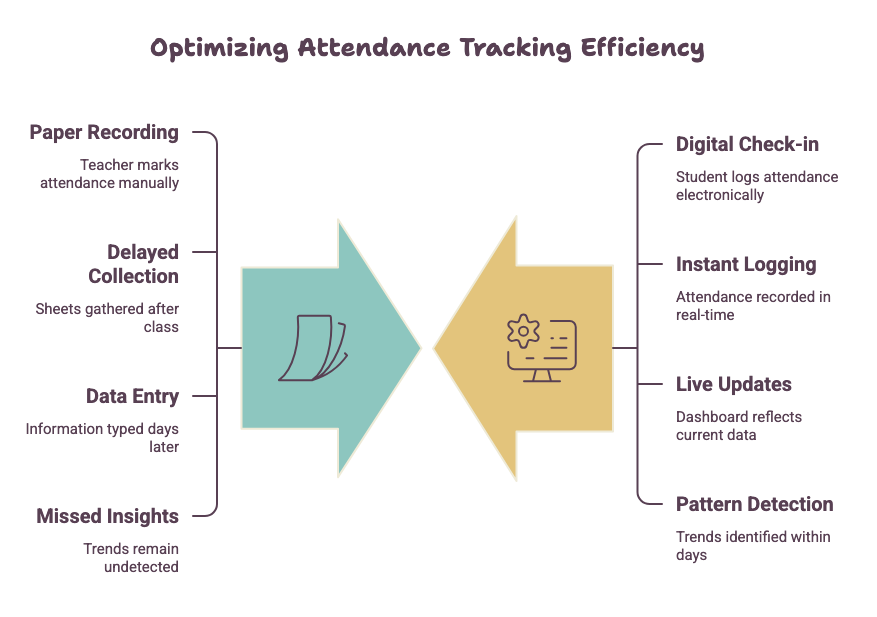
Most schools assume the core value of this kind of app is the scheduling itself. The real payoff is bigger: automatic attendance tracking.
Manual flex time forces someone to confirm attendance by hand, then enter it somewhere useful, often hours or days later. An automated system captures that data the instant a student checks in, giving teachers and administrators an accurate, live picture of who’s receiving support and who’s falling through the cracks.
This isn’t a minor upgrade. A student who consistently skips their intervention block is proof that a plan isn’t working, no matter how well it was designed on paper. Real-time data exposes that pattern in days, not months, and gives staff the window they need to act before it’s too late.
Secret #2: The Most Effective Flex Time Isn’t “Flexible” for Students
Here’s a hard truth: schools that get the most out of flex time treat it as structured, assigned time, never a free period where students choose whatever they want.
A strong intervention process uses flex time for three distinct purposes:
- Targeted academic support for students below grade-level benchmarks
- Enrichment and extension activities for students who’ve already mastered the material
- Service learning and community service opportunities that build engagement while keeping students accounted for on campus
When one system manages all three from a single dashboard, staff can move a student between categories the moment their needs shift, from remedial reading support into a peer-tutoring role, for example, without losing a single record.
Why Structure Outperforms “Free Choice” Flex Blocks
Unstructured flex time rewards the students loudest about asking for help and leaves quieter strugglers invisible. Assigning sessions based on hard data, such as grades, screener scores, and teacher referrals, sends support where it’s actually needed, not just where it’s requested. A clear, well-structured schedule also does something less obvious: it helps students stay focused instead of spending half the period figuring out where they’re supposed to be.
Secret #3: Middle Schools Demand a Fundamentally Different Approach
Elementary schools run RTI within a single homeroom. High schools build interventions into elective periods. Middle schools sit in a far harder middle ground. Students rotate through multiple teachers, schedules grow more complex, and the number of subjects needing support multiplies fast.
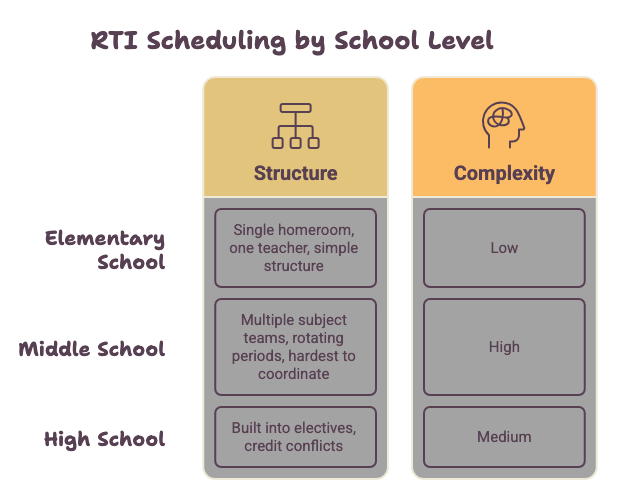
The scheduling challenge looks different at every level:
| School Level | Typical RTI Structure | Biggest Scheduling Challenge |
| Elementary | Runs inside one homeroom, one teacher | Fitting intervention into an already packed single-teacher day |
| Middle School | Spread across multiple subject teams and daily periods | Coordinating teachers who rarely share a planning period |
| High School | Built into elective or advisory periods | Matching electives, credits, and intervention without schedule conflicts |
A tool built for this age group has to manage:
- Multiple daily flex periods across different subject teams
- Students needing support in more than one subject at once
- Coordination between grade-level teams that rarely share a planning period
Schools that force a generic elementary-style tool into a middle school setting run into bottlenecks almost immediately: too many students, too few available teacher slots, same period, every day. Purpose-built software solves this by balancing group sizes and teacher availability automatically, instead of demanding manual fixes every week. For a closer look at how administrators coordinate all of this day to day, this guide walks through the process in more detail.
Secret #4: Service Learning Belongs in the Same Schedule as Academic Support
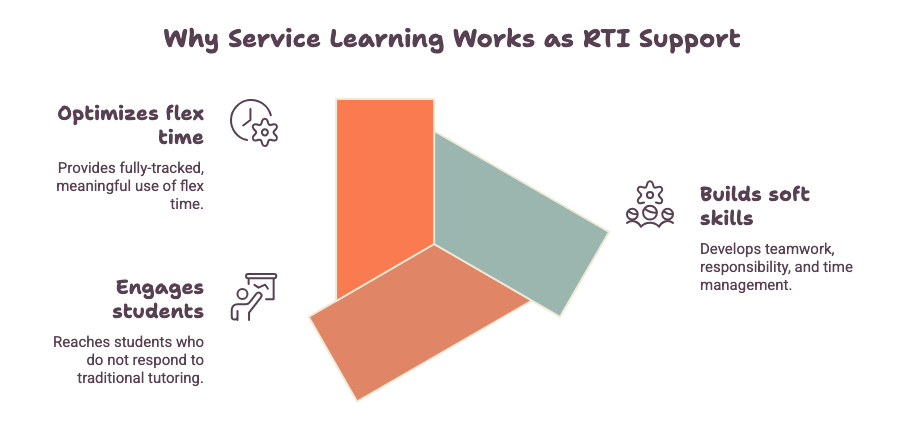
Community service and service learning are too often treated as an afterthought, separate from RTI entirely. The strongest schools fold these opportunities directly into their flex time rotation, running them through the exact same system that manages academic intervention.
This approach delivers real results for:
- Students who respond better to hands-on, purpose-driven work than traditional tutoring
- Building soft skills, such as teamwork, responsibility, and time management, alongside academic ones
- Giving students who don’t need remedial support a meaningful, fully-tracked use of flex time
Run service learning through the same platform as academic interventions, and attendance, participation, and outcomes all live in one place, not scattered across a paper sign-up sheet in the front office.
The academic case for this holds up outside of scheduling logistics too. Edutopia has documented how service learning projects can build students’ social-emotional skills while giving them a genuine stake in the outcome, benefits that are much easier to sustain when the sessions are actually tracked instead of run informally.
RTI Scheduler Secret #5: Best Practices Start With Student Data, Never the Schedule Itself
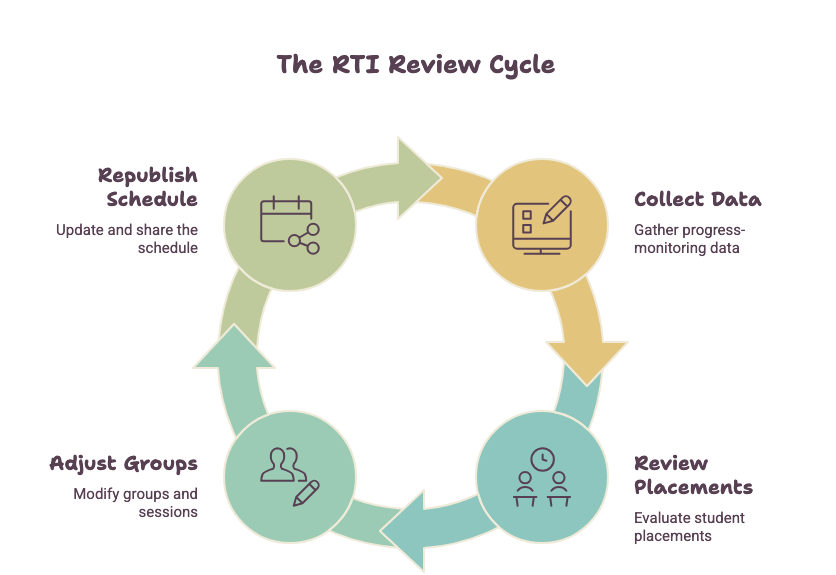
It’s tempting to build the schedule first and force students into it. Schools that get the strongest results do the exact opposite: they start with a clear, current picture of what each student actually needs, then let the schedule form around that data.
A few habits worth adopting:
- Review screener and progress-monitoring data on a fixed cycle, at least every few weeks, so groups reflect current need, not need from three months ago.
- Keep group sizes small. Small-group research consistently shows it leads to stronger learning outcomes than large flex sessions, across every tier of support.
- Track time, not just attendance. How long a student has actually received support often matters as much as whether they showed up at all.
- Loop teachers in early. Classroom teachers usually spot a struggling student before any data system does, so build a direct referral pathway so that insight never gets lost.
- Revisit tiering constantly. A student moving from Tier 3 to Tier 1 support should move through the system just as fast as they moved through the data.
Secret #6: Time, Not Budget, Is the Resource Schools Actually Run Out Of
Budget dominates most conversations about intervention programs, but time is the tighter, harder constraint. There are only so many minutes in a school day, only so many staff free during any given period, and only so much room in the gym, library, or cafeteria when multiple groups need space at once.
A well-built scheduler treats time as the primary resource to optimize, balancing staff availability, room capacity, and student need all at once, instead of scheduling one variable and hoping the rest fall into place. For a school with more than a couple hundred students, solving that puzzle by hand is nearly impossible. Software built for the job handles it without breaking a sweat.
Secret #7: A Strong Process Rewrites Its Own Rules All Year Long
September’s needs look nothing like March’s. Screener results shift, new students enroll, some kids catch up faster than expected, and others need far more support than anyone planned for.
Schools that treat scheduling as a “set it once” job watch its effectiveness decay as the year goes on, simply because the plan stops matching reality. The strongest programs revisit their approach every progress-monitoring cycle, adjusting group assignments, session frequency, and even flex time structure the moment new data comes in.
Illustrative example: consider a middle school that builds its Tier 2 reading groups in September and doesn’t touch them again until the spring benchmark. By January, several students have caught up and no longer need the support, while a handful of others who were fine in the fall have quietly started to struggle in a different subject. Because the groups were never revisited, the students who’ve caught up keep occupying seats they no longer need, and the students who are now falling behind have no path into the program until the next official review months later. A school running short, scheduled check-ins every few weeks would likely catch both shifts in time to act. (This is a hypothetical scenario used to illustrate the point, not a documented case study from a specific school.)
A system that makes mid-year adjustments fast and simple, instead of demanding a full manual rebuild, is the clearest sign of a tool built for how schools actually run, not how they’re supposed to run on paper.
Frequently Asked Questions
What does an RTI scheduler actually do? It automates the process of assigning students to intervention groups, flex time blocks, or academic support sessions based on real data such as grades, attendance, and screener scores, while tracking attendance and outcomes automatically.
Is this kind of software only built for elementary schools? No. While many tools originated in elementary settings, platforms built for middle and high schools handle the added complexity of multiple daily periods, subject-specific support, and coordination across teacher teams.
How does it improve attendance tracking? Most platforms log attendance the instant a student checks into their assigned session, replacing manual sign-in sheets with a real-time view of participation instead of a delayed paper trail.
Can service learning and community service run through the same system? Yes. Leading schools schedule service learning and community service alongside academic interventions on one platform, keeping every piece of flex time activity in a single place.
How often should schools update intervention groups? Best practice is to review and adjust groups every progress-monitoring cycle, typically every few weeks, so the schedule always reflects current student needs, not outdated data.
Bringing It All Together
An RTI scheduler is not a digital calendar. It’s the operational backbone that turns a well-designed intervention plan into something that actually happens, every day, for every student who needs it. From automated attendance tracking to sharper flex time structuring, the schools getting real results treat scheduling with the same seriousness they treat the interventions themselves.
If your school or district is still running flex time off spreadsheets and sticky notes, it’s worth exploring what a dedicated RTI scheduler can take off your plate, from automated attendance to smarter, data-driven placement.